Dependencies multiply
Every forgotten project can carry another copy of thousands of packages.
 RepoSweep
A Mac cleaner that speaks developer
RepoSweep finds generated folders, build outputs, caches, and logs inside projects you choose. Review every item, then move it safely to Trash.
Projects scannode_modules.nextcoverageThe problem
Finder shows folder sizes, but it cannot explain which developer artifacts regenerate safely—or which ones deserve caution.
Every forgotten project can carry another copy of thousands of packages.
Framework caches and generated output linger long after the project goes quiet.
Source code, secrets, databases, and uploads can sit beside disposable files.
Developer-aware
RepoSweep starts with project folders—not the whole system—and recognizes common artifacts by name.
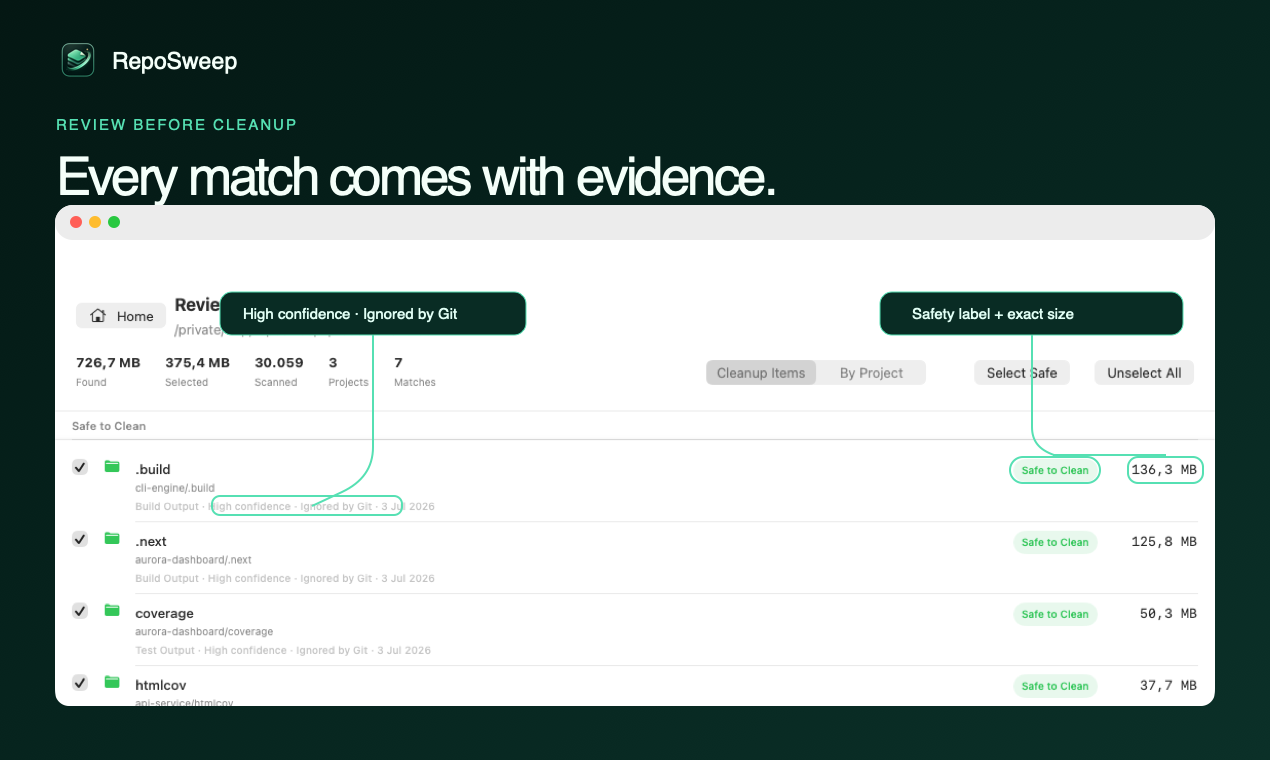
node_modules.nextdistbuild.turbocoverage__pycache__*.logGenerated output and caches that can normally be recreated. Selected by default, always reviewable.
Dependencies and generic caches that may require a reinstall or rebuild. Never preselected.
Downloads such as exports and documents that may matter. Always left for your decision.
See it in action
Watch RepoSweep scan a projects folder, explain its evidence, and move only reviewed items to Trash.
How it works
RepoSweep gets access only to the project or Downloads folder you explicitly select.
See path, size, last modified date, safety level, and a plain-language explanation.
Confirm your selection. Items go to macOS Trash and are never permanently erased.
Why RepoSweep
Cleaning developer machines is a trust problem, not a search problem. Here is how RepoSweep compares to what you use today.
System cleaners treat your repositories like junk drawers and delete by folder name. RepoSweep verifies the project ecosystem behind every artifact, refuses anything Git tracks, and never touches secrets, databases, uploads, or model weights.
rm -rf node_modules is fast — and unforgiving. RepoSweep shows evidence for every match, tells you how each item regenerates, revalidates it immediately before cleanup, and only ever uses macOS Trash, so every decision is reversible.
Finder can show folder sizes, but not which of them regenerate safely. RepoSweep groups reclaimable space per project across three scan modes — repositories, global developer caches, and Downloads — in one review screen.
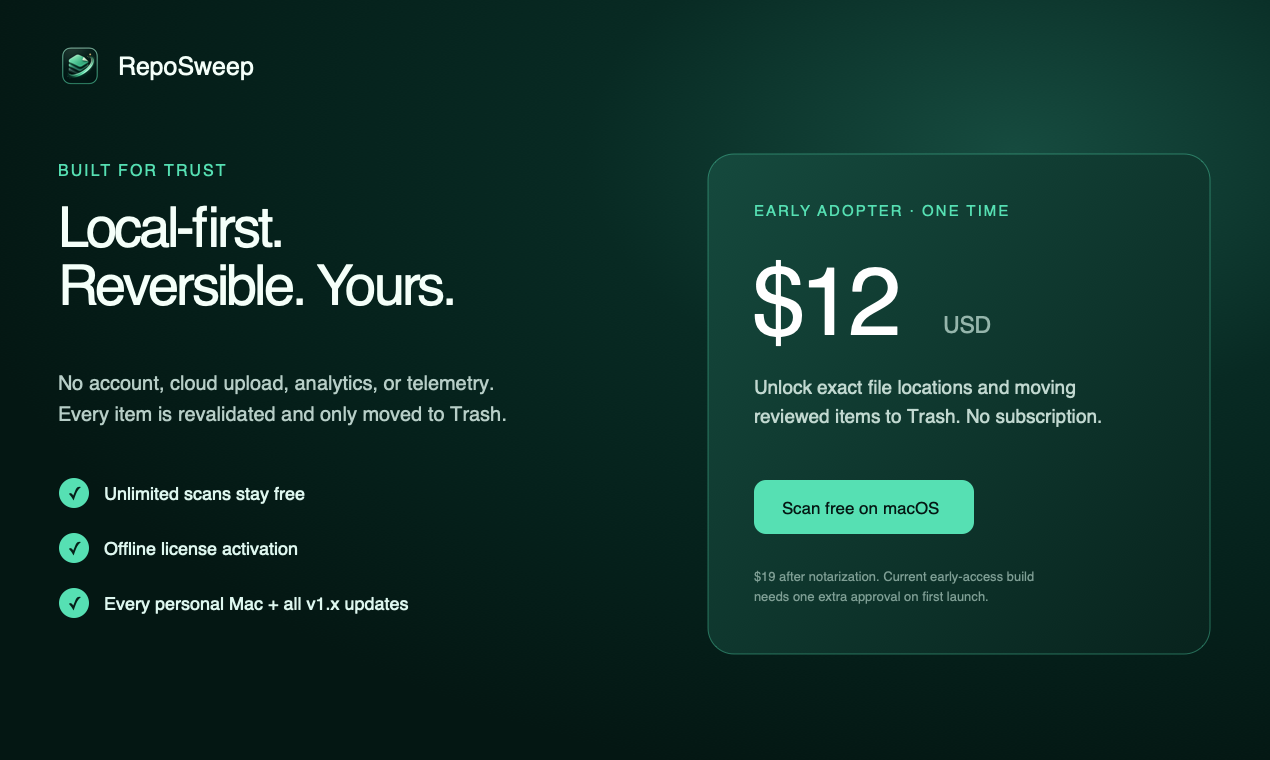
No telemetry, no analytics, no account, no activation server — the license key is verified right on your Mac. RepoSweep only touches the network when you press Check for Updates, and never in the background.
There is no permanent-delete path anywhere in the app. Anything you clean can be restored with Finder's Put Back until you empty Trash.
Scanning is free forever. One $12 payment unlocks cleanup on all your personal Macs. No subscription, no account.
From the community
“The git status check before trashing is a nice touch, gives real peace of mind compared to other cleaners that just nuke whatever looks big. Reclaiming 40gb from old node_modules felt almost too easy.”
Aslıhan · Product Hunt
“The safety checks here are genuinely thoughtful, especially the revalidation pass before hitting Trash. Way too many cleaners just nuke whatever looks old.”
Ayfer · Product Hunt
“The git status check before trashing anything is genuinely thoughtful, way less scary than my usual rm -rf node_modules ritual.”
Arya Özdoğru · Product Hunt
FAQ
Usually. Your package manager can reinstall it, but doing so takes time and may require network access. RepoSweep shows it unselected by default.
Point RepoSweep at the folder that contains your projects. It finds every node_modules, verifies the project and Git status, and moves the ones you select to macOS Trash.
Yes — Xcode regenerates DerivedData on the next build. RepoSweep lists DerivedData per project along with simulator caches and device support symbols, and explains how each regenerates.
No. RepoSweep only moves reviewed items to macOS Trash.
Scanning is free without limits — you see every reclaimable item, its type, and its size. A one-time license reveals exact locations and unlocks cleanup for a one-time $12. No subscription, no account, and the key activates offline.
No. Scanning and history remain on your Mac; there is no cloud processing or account.
Yes. Cleaned items are placed inside a visible folder named like “RepoSweep Cleanup 2026-07-11 at 05.19” in macOS Trash, keeping their original folder structure. Use Finder's Put Back on that folder (or drag anything out of it) to restore — until you empty the Trash, nothing is gone.
Moving to Trash frees no space by design — the files still exist so you can restore them. Space comes back when you empty the Trash. Even then, macOS may hold freed space as "purgeable" for a while (local Time Machine snapshots) and the Storage settings panel updates slowly; df -h / in Terminal shows the real number immediately.
Xcode and toolchain caches: yes. Since v0.2, RepoSweep scans well-known developer caches such as Xcode DerivedData, npm, Yarn, pip, Homebrew, Gradle, Maven, and Cargo caches. Docker cleanup is not supported yet.
Built for macOS 14+